
 Hyundai Azera: Parking Brake Assembly Repair procedures
Fifth generation HG (2011–2026) / Hyundai Azera 2011-2026 Service Manual / Brake System / Parking Brake System / Parking Brake Assembly Repair procedures
Hyundai Azera: Parking Brake Assembly Repair procedures
Fifth generation HG (2011–2026) / Hyundai Azera 2011-2026 Service Manual / Brake System / Parking Brake System / Parking Brake Assembly Repair procedures
Fifth generation HG (2011–2026) / Hyundai Azera 2011-2026 Service Manual / Brake System / Parking Brake System / Parking Brake Assembly Repair procedures
| Removal |
Parking Brake Shoe
| 1. |
Raise the vehicle, and make sure it is securely supported. |
| 2. |
Remove the rear tire and wheel. |
| 3. |
Remove the rear brake caliper and Rear disc brake.
(Refer to "Rear disc brake removal") |
| 4. |
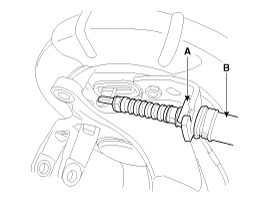
Remove the parking brake cable (B), after removing the fixing clip (A).
|
| 5. |
Remove the hub assembly.
|
| 6. |
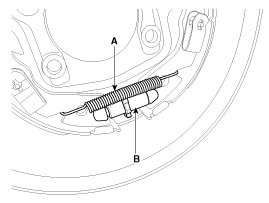
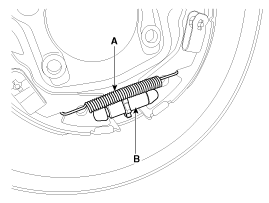
Remove the adjuster assembly (B) and the lower return spring (A).
|
| 7. |
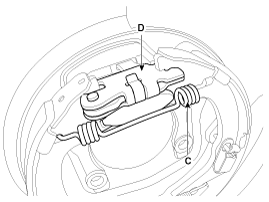
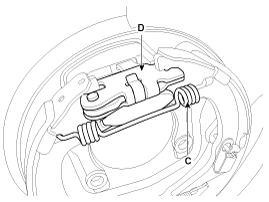
Remove the upper return spring (C) operating lever assembly (D).
|
| 8. |
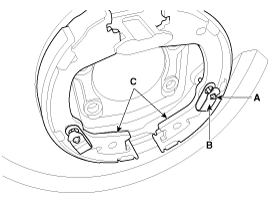
Remove the shoe hold down pin (A) and the spring (B) by pressing and rotating the spring.
|
| 9. |
Remove the brake shoes (C). |
| Installation |
Parking Brake Shoe
| 1. |
Install the shoe hold down pin (A) and spring (B) by pressing and rotating the spring.
|
| 2. |
Install the operating lever assembly (D) and the upper return spring (C).
|
| 3. |
Install the adjuster assembly (B) and the lower return spring (A).
|
| 4. |
Install the hub assembly.
|
| 5. |
Install the parking brake cable (B), and then install the fixing clip (A).
|
| 6. |
Install the rear brake disc, then adjust the rear brake shoe clearance.
|
| 7. |
Install the brake caliper assembly.
(Refer to "Rear brake installation") |
| 8. |
Install the tire and wheel, after installing the plug on the disc. |
| 9. |
If the parking brake shoe or the brake disc are replaced a newly one, perform the brake shoe bed-in procedure.
|

 Components and Components Location
Components (1)
1. Parking brake pedal2. Parking brake cable3. Equalizer assembly
Components (2)
1. Backing plate2. Operating lever3. Upper spring4. Lower spring5. Adjuster6. Shoe hold down ...
 Parking Brake Pedal Assembly Repair procedures
Removal
1.
Turn ignition switch OFF and disconnect the negative (-) battery cable.
2.
Remove the crash pad lower panel.
(Refer to Body - "Crash pad lower panel")
3.
Remove the junction b ...
See also:
Troubleshooting
Troubleshooting
SymptomPossible causeRemedySpeedometer does not operateCluster fuse (10A) blownCheck for short and replace fuseSpeedometer faultyCheck speedometerCAN line faultyCheck the TCUWirin ...
TPMS Sensor Description and Operation
Description
1.
Mode
(1)
Configuration State
A.
All sensors should be in the Low Line state.
B.
In High Line configuration, sensor transmissions occur every 1 minute (nominal) and pressure ...
Vehicle stability management (VSM)
This system provides further enhancements to vehicle stability and steering responses
when a vehicle is driven on a slippery road or a vehicle detects changes in coefficient
of friction between righ ...
Categories
Hyundai Azera Manuals

© 2011-2026 Copyright www.hgmanual.com