
 Hyundai Azera: iPod® Mode Menu
Fifth generation HG (2011–2026) / Hyundai Azera 2011-2026 Owners Manual / Features of your vehicle / iPod® Mode / iPod® Mode Menu
Hyundai Azera: iPod® Mode Menu
Fifth generation HG (2011–2026) / Hyundai Azera 2011-2026 Owners Manual / Features of your vehicle / iPod® Mode / iPod® Mode Menu
If you press the  key, you will
have access to the Repeat, Shuffle and List features.
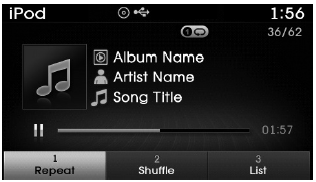
Repeat
Press the  key
key
 Select

- Repeat Once : Repeats the current song.
Shuffle
Press the  key
key
 Select

- Shuffle Album : Plays songs within the current category in random order.
- Shuffle All : Plays all songs in Random order.
List
Press the  key
key
 Select

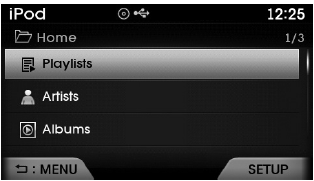
Press the  ,
,
 keys to search for the desired file
and press the  key to select.
 Using iPod® Mode
Playing/Pausing iPod® Songs
Once an iPod® is connected, the mode will automatically start and begin playing
an iPod® song.
While playing, press the key to
pause and press again to play.
...
 Aux mode
...
See also:
Tires and wheels
✽ NOTICE
It is permissible to add 3psi to the standard tire pressure specification
if colder temperatures are expected soon. Tires typically loose 1psi for every 12°F
temperature drop. If ...
Switching to Radio Mode
Pressing the key will change the
operating mode in order of FM1 ➟ FM2 ➟ AM ➟ XM1 ➟ XM2 ➟ XM3.
If [Mode Pop up] is turned on within
[Display], then pressing ...
Transmitter Repair procedures
Inspection
1.
Check that the red light flickers when the door lock or unlock button is pressed on the transmitter.
2.
Remove the battery (A) and check voltage if the red light doesn't flicker. ...
Categories
Hyundai Azera Manuals
