
 Hyundai Azera: Roof Trim Assembly Repair procedures
Fifth generation HG (2011–2026) / Hyundai Azera 2011-2026 Service Manual / Body (Interior and Exterior) / Roof Trim / Roof Trim Assembly Repair procedures
Hyundai Azera: Roof Trim Assembly Repair procedures
Fifth generation HG (2011–2026) / Hyundai Azera 2011-2026 Service Manual / Body (Interior and Exterior) / Roof Trim / Roof Trim Assembly Repair procedures
Fifth generation HG (2011–2026) / Hyundai Azera 2011-2026 Service Manual / Body (Interior and Exterior) / Roof Trim / Roof Trim Assembly Repair procedures
| Replacement |
|

| 1. |
Remove the front seat assembly.
(Refer to Front Seat - "Front Seat Assembly") |
| 2. |
Remove the rear seat assembly.
(Refer to Rear Seat - "Rear Seat Assembly") |
| 3. |
Remove the console rear complete & console front complete assembly.
(Refer to Floor Console - "Floor Console Assembly") |
| 4. |
Remove the front pillar trim.
(Refer to Interior Trim - "Front Pillar Trim") |
| 5. |
Remove the center pillar upper trim.
(Refer to Interior Trim - "Center Pillar Trim") |
| 6. |
Remove the rear pillar trim.
(Refer to Interior Trim - "Rear Pillar Trim") |
| 7. |
Remove the sunvisor and retainer.
(Refer to Roof Trim - "Sunvisor") |
| 8. |
Remove the assist handle.
(Refer to Roof Trim - "Assist Handle") |
| 9. |
Remove the overhead console lamp.
|
| 10. |
Remove the room lamp.
|
| 11. |
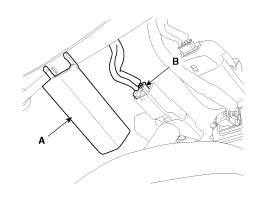
Remove the ECM mirror cover (A). |
| 12. |
Disconnect the ECM mirror connector (B).
|
| 13. |
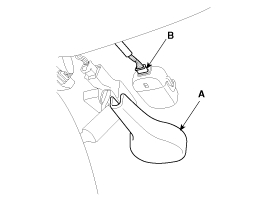
Remove the rain sensor cover (A). |
| 14. |
Disconnect the rain sensor connector (B).
|
| 15. |
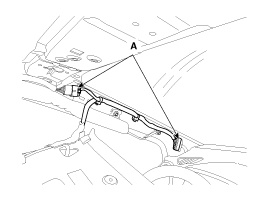
Disconnect the roof trim main connectors (A).
|
| 16. |
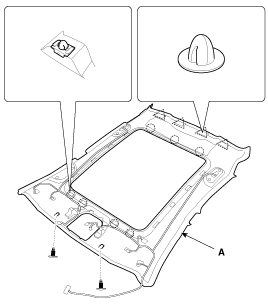
Detach the clips, then remove the roof trim assembly (A).
|
| 17. |
Remove the vanity lamp.
|
| 18. |
Remove the hands free mic.
|
| 19. |
Installation is the reverse of removal.
|

 Roof Trim Assembly Components and Components Location
Component Location
1. Roof Trim Assembly
...
 Interior Trim
...
See also:
Tire specification and pressure label
The tires supplied on your new vehicle are chosen to provide the best performance
for normal driving.
The tire label located on the driver's side center pillar gives the tire pressures
recomm ...
Oil Cooler Components and Components Location
Components
1. Radiator2. Radiator mounting bracket3. Radiator cap4. Drain plug5. Mounting insulator
...
Snowy or icy conditions
To drive your vehicle in deep snow, it may be necessary to use snow tires or
to install tire chains on your tires. If snow tires are needed, it is necessary
to select tires equivalent in size and ty ...
Categories
Hyundai Azera Manuals

© 2011-2026 Copyright www.hgmanual.com