
 Hyundai Azera: Turn by Turn
The Turn by Turn feature can be used through Blue Link®.
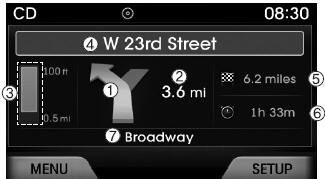
(1) Direction Indicator Image
(2) Remaining distance until next point
(3) The Count bar is divided into a total of 9 levels.
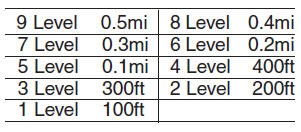
(4) Next Street name
(5) Distance to destination
(6) Expected Time Arrival
(7) Current Street name
 Eco Coach
• What is Eco Coach?
Every 2.5 minutes, Eco Coach compares your fuel economy against the government
tested average (EPA) or other similar Hyundai models (community), based on your
preference. E ...
 Driving your vehicle
Be sure the exhaust system does not leak.
The exhaust system should be checked whenever the vehicle is raised to change
the oil or for any other purpose. If you hear a change in the sound of the exh ...
See also:
Power Door Lock Switch Repair procedures
Inspection
Diagnosis With GDS
1.
It will be able to diagnose defects of DDM/ADM with GDS
quickly. GDS can operates actuator forcefully, input/output value
monitoring and self diagnosis.
2. ...
Pairing through [PHONE] Setup
Press the key
Select [Phone]
Select [Pair Phone]
Select
TUNE knob
1.The following steps are the same as those described in the section "When No
Devices have been Paired&qu ...
Checking the engine oil level
1. Be sure the vehicle is on level ground.
2. Start the engine and allow it to reach normal operating temperature.
3. Turn the engine off and wait for a few minutes (about 5 minutes) for the oil
to ...
Categories
Hyundai Azera Manuals
