
 Hyundai Azera: Dynamic Damper Repair procedures
Fifth generation HG (2011–2026) / Hyundai Azera 2011-2026 Service Manual / Driveshaft and axle / Driveshaft Assembly / Dynamic Damper Repair procedures
Hyundai Azera: Dynamic Damper Repair procedures
Fifth generation HG (2011–2026) / Hyundai Azera 2011-2026 Service Manual / Driveshaft and axle / Driveshaft Assembly / Dynamic Damper Repair procedures
Fifth generation HG (2011–2026) / Hyundai Azera 2011-2026 Service Manual / Driveshaft and axle / Driveshaft Assembly / Dynamic Damper Repair procedures
| Replacement |
| 1. |
Remove the front driveshaft.
(Refer to Driveshaft Assembly - “Front Driveshaft�) |
| 2. |
Remove the TJ joint assembly.
(Refer to Driveshaft Assembly - “TJ Joint�) |
| 3. |
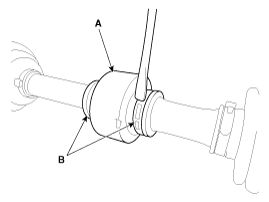
Using a pillar or flat-tipped(-) screwdriver, remove the both side of clamp(B) of the dynamic damper(A).
|
| 4. |
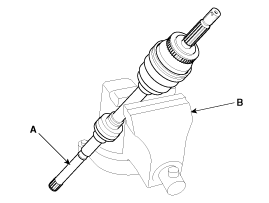
Fix the driveshaft (A) with a vice (B) as illustrated.
|
| 5. |
Apply soap powder on the shaft to prevent being damaged
between the shaft spline and the dynamic damper when the dynamic damper
is removed. |
| 6. |
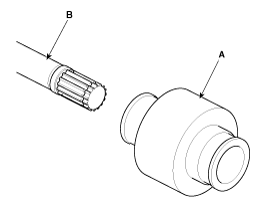
Seperate the dynamic damper (A) from the shaft (B) carefully.
|
| Installation |
| 1. |
Apply soap powder on the shaft to prevent being damaged between the shaft spline and the dynamic damper. |
| 2. |
Install the dynamic damper (A). |
| 3. |
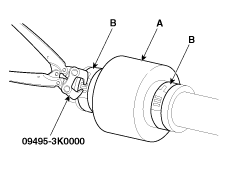
Using the SST(09495-3K000), secure the dynamic damper bands (B).
|
| 4. |
Install the TJ joint assembly.
(Refer to Driveshaft Assembly - “TJ Joint�) |
| 5. |
Install the front driveshaft.
(Refer to Driveshaft Assembly - “Front Driveshaft�) |
 Dynamic Damper Components and Components Location
Components
1. BJ assembly2. Circlip3. BJ boot band4. BJ boot 5. Dynamic damper band6. Dynamic damper7. Shaft8. TJ boot band 9. TJ boot10. Spider assembly11. Snap ring12. TJ case 13. Circlip
...
 BJ Boot Components and Components Location
Components
[LH]
1. BJ assembly2. Circlip3. BJ boot band4. BJ boot 5. Dynamic damper band6. Dynamic damper7. Shaft8. TJ boot band 9. TJ boot10. Spider assembly11. Snap ring12. TJ case 13. Circl ...
See also:
Head Lamps Description and Operation
HID Head Lamp
1.
Bulb
(1)
Elements
Xenon gas: Xenon gas activates the initial reaction for rapid illuminating.
Molybdenum electrode: anode arcing
Metal halide salts: color composing component ...
Outside rearview mirror
Be sure to adjust mirror angles before driving.
Your vehicle is equipped with both left-hand and right-hand outside rearview
mirrors. The mirrors can be adjusted remotely with the remote switch. The ...
Front Wiper Motor Repair procedures
Removal
1.
Loosen the windshield wiper arm nut (B) after removing a wiper cap (A).
2.
Remove the windshield wiper arm and blade.
3.
If necessary, release the wiper blade fixing clip by pul ...
Categories
Hyundai Azera Manuals

© 2011-2026 Copyright www.hgmanual.com