
 Hyundai Azera: Turn signals and lane change signals
Fifth generation HG (2011–2026) / Hyundai Azera 2011-2026 Owners Manual / Features of your vehicle / Lighting / Turn signals and lane change signals
Hyundai Azera: Turn signals and lane change signals
Fifth generation HG (2011–2026) / Hyundai Azera 2011-2026 Owners Manual / Features of your vehicle / Lighting / Turn signals and lane change signals
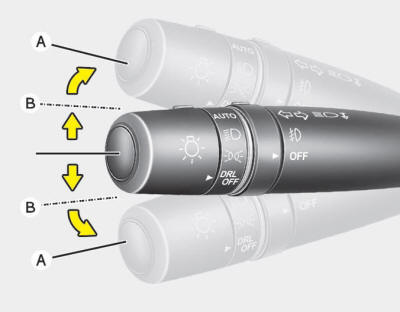
The ignition switch must be on for the turn signals to function. To turn on the turn signals, move the lever up or down (A). Green arrow indicators on the instrument panel indicate which turn signal is operating. They will self-cancel after a turn is completed. If the indicator continues to flash after a turn, manually return the lever to the OFF position.
To signal a lane change, move the turn signal lever slightly and hold it in position (B). The lever will return to the OFF position when released.
If an indicator stays on and does not flash or if it flashes abnormally, one of the turn signal bulbs may be burned out and will require replacement.
One-touch triple turn signal
To activate the one-touch triple turn signal move the turn signal lever slightly and then release it. The lane change signals will blink 3 times.
✽ NOTICE
If an indicator flash is abnormally quick or slow, a bulb may be burned out or have a poor electrical connection in the circuit.
 High beam operation
To turn on the high beam headlights, push the lever away from you. Pull it back
for low beams.
The high beam indicator will light when the headlight high beams are switched
on.
To prevent the ...
 Front fog light
Fog lights are used to provide improved visibility and avoid accidents when visibility
is poor due to fog, rain or snow etc.
The fog lights will turn on when :
1. The headlight is turned on.
2 ...
See also:
Rearview camera (If equipped)
The rearview camera will activate when the back-up light is ON with the ignition
switch ON and the shift lever in the R (Reverse) position.
This system is a supplemental system that shows behind t ...
Rail Pressure Sensor (RPS) Description and Operation
Description
Rail Pressure Sensor (RPS) is installed on the delivery pipe
and measures the instantaneous fuel pressure in the delivery pipe. The
sensing element (Semiconductor element) built in ...
Roof Trim Assembly Repair procedures
Replacement
•
Use a plastic panel removal tool to remove interior trim pieces to protect from marring the surface.
•
Put on gloves to protect your hands.
1. ...
Categories
Hyundai Azera Manuals
