
 Hyundai Azera: Aux, USB and iPod® port
Fifth generation HG (2011–2026) / Hyundai Azera 2011-2026 Owners Manual / Features of your vehicle / Multimedia system / Aux, USB and iPod® port
Hyundai Azera: Aux, USB and iPod® port
Fifth generation HG (2011–2026) / Hyundai Azera 2011-2026 Owners Manual / Features of your vehicle / Multimedia system / Aux, USB and iPod® port
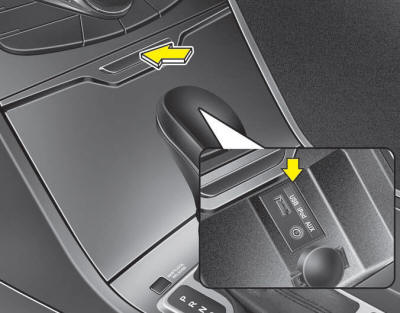
If your vehicle has an aux, USB (universal serial bus) port or iPod® port, you can use an aux port to connect audio devices, a USB port to plug in a USB and an iPod® port to plug in an iPod®.
When using a portable audio device connected to the power outlet, noise may occur during playback. If this happens, use the power source of the portable audio device.
 Navigation system
The navigation system ascertains the present position of your vehicle by using
information from satellites and guides you to the place you assign as the destination.
Detailed information for the nav ...
 How vehicle audio works
AM and FM radio signals are broadcast from transmitter towers located around
your city. They are intercepted by the radio antenna on your vehicle. This signal
is then processed by the radio and se ...
See also:
Inside Rear View Mirror Components and Components Location
Component Location
1. Inside rear view mirror
...
Inhibitor Switch Repair procedures
Inspection
•
Thoroughly check connectors for looseness, poor connection, bending, corrosion, contamination, deterioration, or damage.
Inspection flow
Items to ch ...
Rear Bumper Cover Repair procedures
Replacement
•
Use a plastic panel removal tool to remove interior trim pieces to protect from marring the surface.
•
Take care not to bend or scratch the trim and ...
Categories
Hyundai Azera Manuals
