
 Hyundai Azera: Floor Console Assembly Repair procedures
Fifth generation HG (2011–2026) / Hyundai Azera 2011-2026 Service Manual / Body (Interior and Exterior) / Floor Console / Floor Console Assembly Repair procedures
Hyundai Azera: Floor Console Assembly Repair procedures
Fifth generation HG (2011–2026) / Hyundai Azera 2011-2026 Service Manual / Body (Interior and Exterior) / Floor Console / Floor Console Assembly Repair procedures
Fifth generation HG (2011–2026) / Hyundai Azera 2011-2026 Service Manual / Body (Interior and Exterior) / Floor Console / Floor Console Assembly Repair procedures
| Replacement |
|

| 1. |
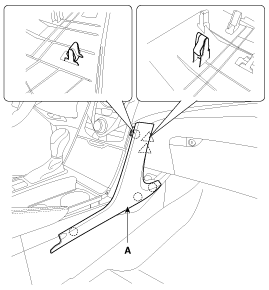
Using a screwdriver or remover, remove the center facia side garnish (A).
|
| 2. |
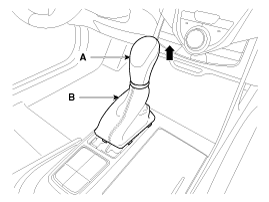
Remove the gear boots (B) and gear knob (A).
|
| 3. |
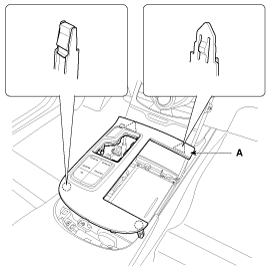
Using a screwdriver or remover, remove the console upper tray complete (A).
|
| 4. |
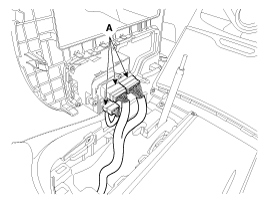
Disconnect the connectors (A).
|
| 5. |
Remove the console tray (A).
|
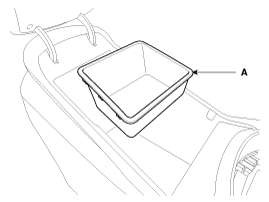
| 6. |
Remove the console tray met (A).
|
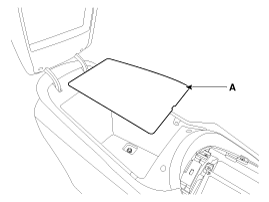
| 7. |
After loosening the mounting screws and bolts, then remove the console rear complete assembly (A).
|
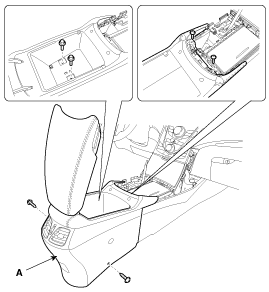
| 8. |
Disconnect the connector (A).
|
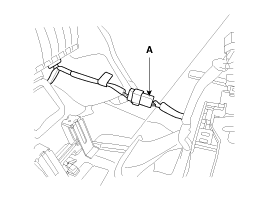
| 9. |
Using a screwdriver or remover, remove the console extension cover (A).
|
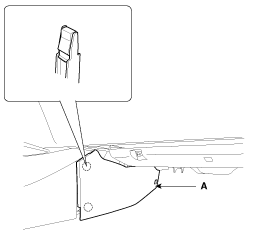
| 10. |
After loosening the mounting screws, then remove the console front complete assembly (A).
|

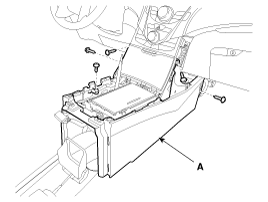
| 11. |
Disconnect the connectors (A).
|
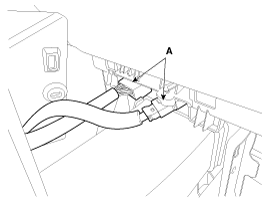
| 12. |
Installation is the reverse of removal.
|
 Floor Console Assembly Components and Components Location
Component Location
[Rear]
1. Console rear complete assembly
[Front]
1. Console front complete assembly
...
 Rear Console Cover Components and Components Location
Component Location
1. Rear console cover
...
See also:
MTS Antenna Components and Components Location
Components
...
Curtain Airbag (CAB) Module Description and Operation
Description
Curtain airbags are installed inside the headliner (LH and
RH) and protect the driver and passenger from danger when side crash
occurs. The SRSCM determines deployment of curtain ai ...
Rear Seat Belt Retractor Repair procedures
Replacement
•
When installing the belt, make sure not to damage the retractor.
1.
Remove the rear package tray trim.
(Refer to Interior Trim - "Rear Package Tray ...
Categories
Hyundai Azera Manuals

© 2011-2026 Copyright www.hgmanual.com