
 Hyundai Azera: CVVT Oil Temperature Sensor (OTS) Repair procedures
Fifth generation HG (2011–2026) / Hyundai Azera 2011-2026 Service Manual / Engine Control/Fuel System / Engine Control System / CVVT Oil Temperature Sensor (OTS) Repair procedures
Hyundai Azera: CVVT Oil Temperature Sensor (OTS) Repair procedures
Fifth generation HG (2011–2026) / Hyundai Azera 2011-2026 Service Manual / Engine Control/Fuel System / Engine Control System / CVVT Oil Temperature Sensor (OTS) Repair procedures
Fifth generation HG (2011–2026) / Hyundai Azera 2011-2026 Service Manual / Engine Control/Fuel System / Engine Control System / CVVT Oil Temperature Sensor (OTS) Repair procedures
| Inspection |
| 1. |
Turn the ignition switch OFF. |
| 2. |
Disconnect the OTS connector. |
| 3. |
Remove the OTS. (Refer to "Removal") |
| 4. |
After immersing the thermistor of the sensor into engine coolant, measure resistance between the OTS terminals 1 and 2. |
| 5. |
Check that the resistance is within the specification.
|
| Removal |
| 1. |
Turn the ignition switch OFF and disconnect the battery negative (-) cable. |
| 2. |
Remove the air cleaner assembly.
|
| 3. |
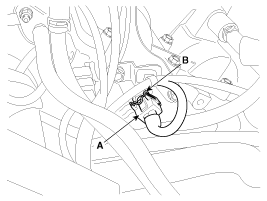
Disconnect the connector (A), and then remove the CVVT oil temperature sensor (B).
|
| Installation |
|

|
|
| 1. |
Installation is reverse of removal.
|
 CVVT Oil Temperature Sensor (OTS) Schematic Diagrams
Circuit Diagram
...
 Accelerator Position Sensor (APS) Description and Operation
Description
Accelerator Position Sensor (APS) is installed on the
accelerator pedal module and detects the rotation angle of the
accelerator pedal. The APS is one of the most important sensors ...
See also:
Hood Latch Release Handle Components and Components Location
Component Location
1. Hood latch release handle
...
Rear window defroster
The defroster heats the window to remove frost, fog and thin ice from the rear
window, while the engine is running.
To activate the rear window defroster, press the rear window defroster button ...
Hood Latch Components and Components Location
Component Location
1. Hood latch
...
Categories
Hyundai Azera Manuals

© 2011-2026 Copyright www.hgmanual.com