
 Hyundai Azera: TPMS Receiver Description and Operation
Fifth generation HG (2011–2026) / Hyundai Azera 2011-2026 Service Manual / Suspension System / Tire Pressure Monitoring System / TPMS Receiver Description and Operation
Hyundai Azera: TPMS Receiver Description and Operation
Fifth generation HG (2011–2026) / Hyundai Azera 2011-2026 Service Manual / Suspension System / Tire Pressure Monitoring System / TPMS Receiver Description and Operation
Fifth generation HG (2011–2026) / Hyundai Azera 2011-2026 Service Manual / Suspension System / Tire Pressure Monitoring System / TPMS Receiver Description and Operation
| Description |
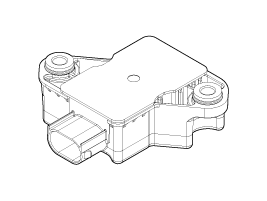
| 1. |
Mode
|
| 2. |
Overview
|
 TPMS Sensor Repair procedures
Removal
1.
Remove the tire.
(Refer to Tires/Wheels - "Tire")
2.
Remove the valve nut.
The valve nut should not be re-used.
Installation
Sensor Fit
& ...
 TPMS Receiver Schematic Diagrams
Circuit Diagram
Connector pin number
Pin NO.DiscriptionRemark1IGN2CAN_Low3-4Battery5CAN_High6Ground
...
See also:
Reverse parking aid function (if equipped)
While the vehicle is moving rearward, the outside rearview mirror(s) will move
downward to aid reverse parking. According to the position of the outside rearview
mirror switch (1), the outside r ...
Power Out Side Mirror Switch Repair procedures
Inspection
1.
The DDM inputs can be checked using the GDS.
2.
To check the input value of door lock switch, select option "IPM".
3.
Select option "DDM (Driver Door Module)".
4.
Select ...
Smart key functions
1. Door lock
2. Door unlock
3. Trunk open
4. Alarm
With a smart key, you can lock or unlock a door (and trunk) and even start the
engine without inserting the key. Refer to the following, for mor ...
Categories
Hyundai Azera Manuals

© 2011-2026 Copyright www.hgmanual.com