
 Hyundai Azera: Fuel Tank Pressure Sensor (FTPS) Repair procedures
Fifth generation HG (2011–2025) / Hyundai Azera 2011-2025 Service Manual / Engine Control/Fuel System / Engine Control System / Fuel Tank Pressure Sensor (FTPS) Repair procedures
Hyundai Azera: Fuel Tank Pressure Sensor (FTPS) Repair procedures
Fifth generation HG (2011–2025) / Hyundai Azera 2011-2025 Service Manual / Engine Control/Fuel System / Engine Control System / Fuel Tank Pressure Sensor (FTPS) Repair procedures
Fifth generation HG (2011–2025) / Hyundai Azera 2011-2025 Service Manual / Engine Control/Fuel System / Engine Control System / Fuel Tank Pressure Sensor (FTPS) Repair procedures
| Inspection |
| 1. |
Connect the GDS on the Data Link Connector (DLC). |
| 2. |
Measure the output voltage of the FTPS.
|
| Removal |
| 1. |
Turn the ignition switch OFF and disconnect the battery negative (-) cable. |
| 2. |
Remove the floor mat in the trunk. |
| 3. |
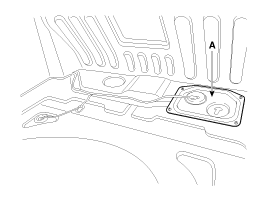
Remove the service cover (A).
|
| 4. |
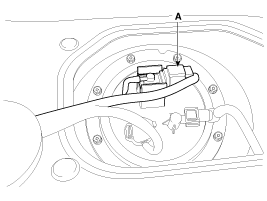
Disconnect the fuel tank pressure sensor connector (A). |
| 5. |
Remove the fuel tank pressure sensor (A) after releasing the hooks veritically.
|
| Installation |
|

|
| 1. |
Installation is reverse of removal. |
 Fuel Tank Pressure Sensor (FTPS) Schematic Diagrams
Circuit Diagram
...
 Injector Description and Operation
Description
Based on information from various sensors, the ECM can
calculate the fuel amount to be injected. The fuel injector is a
solenoid-operated valve and the fuel injection amount is cont ...
See also:
Surge Tank Repair procedures
Removal and Installation
1.
Drain the coolant.
(Refer to Cooling System - "Coolant")
2.
Remove the air cleaner assembly.
(Refer to Intake And Exhaust System - "Air Cleaner")
3.
Disconn ...
TJ Joint Repair procedures
Replacement
•
Special grease must be applied to the driveshaft joint. Do not substitute with another type of grease.
•
The boot band should be replaced with a ne ...
Front Strut Assembly Repair procedures
Replacement
1.
Remove the front wheel & tire (A).
Tightening torque:
88.3 ~ 107.9N.m (9.0 ~ 11.0kgf.m, 65.1 ~ 79.6lb-ft)
Be careful not to damage to the hub bolts ...
Categories
Hyundai Azera Manuals

© 2011-2025 Copyright www.hgmanual.com