
 Hyundai Azera: MTS Antenna Repair procedures
Fifth generation HG (2011–2026) / Hyundai Azera 2011-2026 Service Manual / Body Electrical System / MTS System / MTS Antenna Repair procedures
Hyundai Azera: MTS Antenna Repair procedures
Fifth generation HG (2011–2026) / Hyundai Azera 2011-2026 Service Manual / Body Electrical System / MTS System / MTS Antenna Repair procedures
Fifth generation HG (2011–2026) / Hyundai Azera 2011-2026 Service Manual / Body Electrical System / MTS System / MTS Antenna Repair procedures
| Removal |
Roof Antenna (GPS)
| 1. |
Remove the rear roof trim.
|
| 2. |
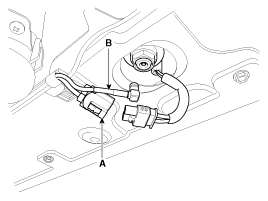
Disconnect the Connector(A) and cables (B) from the roof antenna.
|
| 3. |
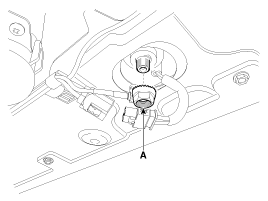
Remove the roof antenna after removing a nut(A).
|
| Installation |
Roof Antenna (GPS)
| 1. |
Install the roof antenna. |
| 2. |
Connect the GPS cable. |
| 3. |
Install the nut. |
| 4. |
Install the rear roof trim.
|

 MTS Antenna Components and Components Location
Components
...
 Smart key System
...
See also:
Purge Control Solenoid Valve (PCSV) Description and Operation
Description
Purge Control Solenoid Valve (PCSV) is installed on the surge
tank and controls the passage between the canister and the intake
manifold. It is a solenoid valve and is open when the ...
Windshield Wiper-Washer Switch Repair procedures
Inspection
1.
The windshield wiper / washer switch inputs can be checked using the GDS.
2.
To check the input value of windshield wiper/washer switch, select option "MFSW".
3.
To consult t ...
Cooling system
Check cooling system components, such as radiator, coolant reservoir, hoses and
connections for leakage and damage. Replace any damaged parts. ...
Categories
Hyundai Azera Manuals

© 2011-2026 Copyright www.hgmanual.com