
 Hyundai Azera: Windshield Wiper-Washer Switch Repair procedures
Fifth generation HG (2011–2026) / Hyundai Azera 2011-2026 Service Manual / Body Electrical System / Windshield Wiper/Washer / Windshield Wiper-Washer Switch Repair procedures
Hyundai Azera: Windshield Wiper-Washer Switch Repair procedures
Fifth generation HG (2011–2026) / Hyundai Azera 2011-2026 Service Manual / Body Electrical System / Windshield Wiper/Washer / Windshield Wiper-Washer Switch Repair procedures
Fifth generation HG (2011–2026) / Hyundai Azera 2011-2026 Service Manual / Body Electrical System / Windshield Wiper/Washer / Windshield Wiper-Washer Switch Repair procedures
| Inspection |
| 1. |
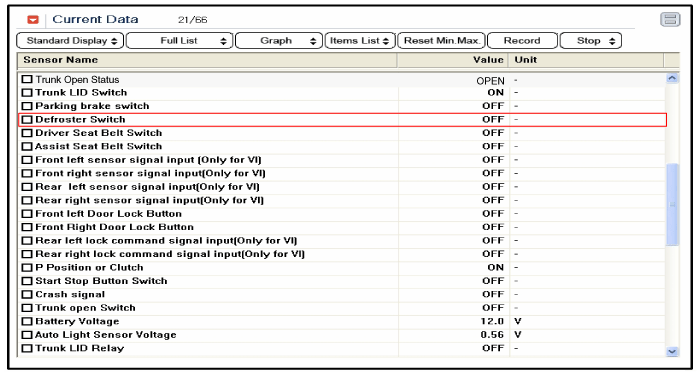
The windshield wiper / washer switch inputs can be checked using the GDS. |
| 2. |
To check the input value of windshield wiper/washer switch, select option "MFSW". |
| 3. |
To consult the present input/output value of IPM, "Current
DATA". It provides information of IPM input/output conditions of
windshield wiper / washer switch.
|
| Removal |
| 1. |
Remove the steering column upper and lower shrouds after removing 3 screws.
|
| 2. |
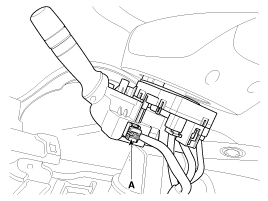
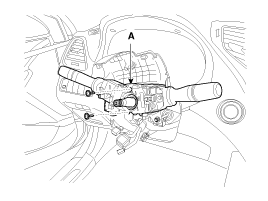
Remove the multifunction switch connector (A).
|
| 3. |
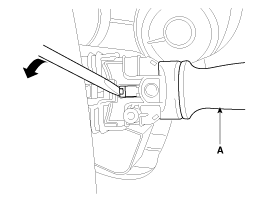
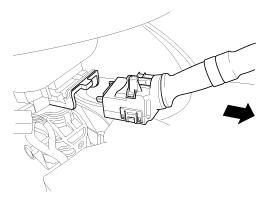
If necessary of removing the wiper & washer switch (A)
only, release the lock of wiper switch using tool without removing the
steering wheel and the clock spring.
|
| 4. |
Remove the steering wheel.
|
| 5. |
Remove the clock spring.
|
| 6. |
Loosen screws (2EA) and remove the multifunction switch assembly (A).
|
| Installation |
| 1. |
Install the multifunction switch. |
| 2. |
Install the clock spring.
|

| 3. |
Install the steering column upper and lower shrouds. |
| 4. |
Install the steering wheel. |
| 5. |
Install the driver airbag module.
|
 Components and Components Location
Component Location
1. Windshield wiper arm & blade2. Wiper & washer switch3. Windshield washer hose4. Windshield wiper motor & linkage5. Washer motor6. Washer reservoir7. Wiper relay ...
 Front Wiper Motor Components and Components Location
Component Location
1. Cap2. Nut3. Wiper arm & blade4. Rivet5. Cowl top cover6. Bolt7. Wiper motor & linkage assembly
...
See also:
2. Evaporative emission control (including ORVR: Onboard Refueling Vapor Recovery)
system
The Evaporative Emission Control System is designed to prevent fuel vapors from
escaping into the atmosphere.
(The ORVR system is designed to allow the vapors from the fuel tank to be loaded
into a ...
Parking Assist Sensor Schematic Diagrams
Circuit diagram
...
Components and Components Location
Component Location
1. Hood switch2. Burglar horn3. IPM and RF antenna4. Key warning switch5. Front door switch6. Front door lock actuator & switch7. Rear door lock actuator & switch8. Rea ...
Categories
Hyundai Azera Manuals

© 2011-2026 Copyright www.hgmanual.com