
 Hyundai Azera: Key operations
Fifth generation HG (2011–2026) / Hyundai Azera 2011-2026 Owners Manual / Features of your vehicle / Keys / Key operations
Hyundai Azera: Key operations
Fifth generation HG (2011–2026) / Hyundai Azera 2011-2026 Owners Manual / Features of your vehicle / Keys / Key operations
- Used to start the engine.
- Used to lock and unlock the doors.
- Used to lock and unlock the glove box.
WARNING - Aftermarket keys
Use only HYUNDAI original parts for the ignition key in your vehicle. If an aftermarket key is used, the ignition switch may not return to ON after START. If this happens, the starter will continue to operate causing possible fire due to excessive current in the wiring.
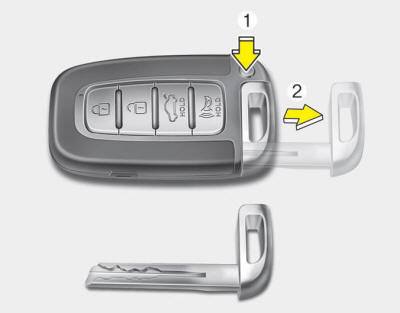
To remove the mechanical key, press and hold the release button(1) and remove the mechanical key(2).
To reinstall the mechanical key, put the key into the hole and push it until a click sound is heard.
Restrictions in handling keys
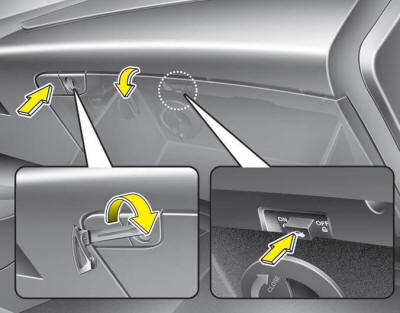
To activate the trunk lock system so that the trunk can only be opened with the mechanical key, perform the following:
1. Press and hold the release button and remove the mechanical key.
2. Unlock the glove box by using the mechanical key then open it.
3. Set the trunk lid control button to the OFF position (unpressed).
4. Close and lock the glove box using the mechanical key.
When leaving your keys with a parking lot attendant or valet, perform above steps 1 to 4, remove the mechanical key from the smart key and leave the smart key with the attendant. In this manner the smart key can only be used to start the engine and operate door locks.
Lock release
To release the trunk lock feature, open the glove box with the mechanical key and set the trunk lid control button to the ON position (pressed). In this position the trunk will open with the trunk lid button or smart key.
 Record your key number
The key code number is stamped on the key code tag attached to the key set. Should
you lose your keys, contact an authorized HYUNDAI dealer. Remove the key code tag
and store it in a safe place. A ...
 Immobilizer system
Your vehicle is equipped with an electronic engine immobilizer system to reduce
the risk of unauthorized vehicle use.
Whenever the ENGINE START/STOP button is changed to the ON position, the immobil ...
See also:
Multimedia Jack Description and Operation
Description
The multimedia jack on the console upper cover is for
customers who like to listen to external portable music players like the
MP3, iPod and etc., through the vehicle's sound system ...
Voice Command List
• Common Commands: These commands can be used in most operations. (However a
few commands may not be available during certain operations)
FM/AM radio commands: available during FM ...
TPMS Sensor Description and Operation
Description
1.
Mode
(1)
Configuration State
A.
All sensors should be in the Low Line state.
B.
In High Line configuration, sensor transmissions occur every 1 minute (nominal) and pressure ...
Categories
Hyundai Azera Manuals
