Throttle Position Sensor (TPS)
| 1. |
Connect the GDS on the Data Link Connector (DLC). |
| 2. |
Start the engine and measure the output voltage of TPS 1 and 2 at C.T. and W.O.T.
Throttle angle(°)
| Output Voltage (V)
| TPS1
| TPS2
| C.T
| 0.5
| 4.5
| W.O.T
| 4.41
| 0.59
|
|
ETC Motor
| 1. |
Turn the ignition switch OFF. |
| 2. |
Disconnect the ETC module connector. |
| 3. |
Measure resistance between the ETC module terminals 1 and 2. |
| 4. |
Check that the resistance is within the specification.
Specification: Refer to “Specification�
|
|
| 1. |
Turn the ignition switch OFF and disconnect the battery negative (-) cable. |
| 2. |
Remove the air intake hose.
|
| 3. |
Disconnect the ETC module connector (A). |
| 4. |
Disconnect the coolant hoses (B). |
| 5. |
Remove the installation bolts, and then remove the ETC module (C) from the engine. 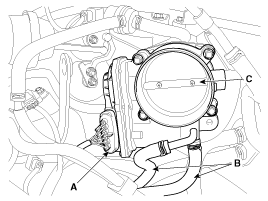
|
| • |
Install the component with the specified torques. |
| • |
Note that internal damage may occur when the component is dropped. If the component has been dropped, inspect before installing. |
|
| 1. |
Installation is reverse of removal.
Electronic throttle body Installation bolt:
9.8 ~ 11.8 N.m (1.0 ~ 1.2 kgf.m, 7.2 ~ 8.7 lb-ft)
|
|
| ETC module learning procedure |
When installing new ETC module or re-installing it, ETC module learning procedure must be performed.
| 1. |
Hold the ignition key or the start button at th IG ON position during 5 seconds. |
| 2. |
Turn ignition swich OFF and then start the engine. |
|
DTC codes (P0638, P2110) might be displayed if ETC module learning procedure does not performed after replacing ETC module. |
Description
Barometric Pressure Sensor (BPS) is a speed-density type
sensor and is installed on the air cleaner assemby. It senses absolute
pressure of the air cleaner assemby and transfers the ...

 Hyundai Azera: ETC (Electronic Throttle Control) System Repair procedures
Fifth generation HG (2011–2026) / Hyundai Azera 2011-2026 Service Manual / Engine Control/Fuel System / Engine Control System / ETC (Electronic Throttle Control) System Repair procedures
Hyundai Azera: ETC (Electronic Throttle Control) System Repair procedures
Fifth generation HG (2011–2026) / Hyundai Azera 2011-2026 Service Manual / Engine Control/Fuel System / Engine Control System / ETC (Electronic Throttle Control) System Repair procedures

 ETC (Electronic Throttle Control) System Schematic Diagrams
 Barometric Pressure Sensor (BPS) Description and Operation