
 Hyundai Azera: Resetting the sunroof
Fifth generation HG (2011–2026) / Hyundai Azera 2011-2026 Owners Manual / Features of your vehicle / Panorama sunroof (If equipped) / Resetting the sunroof
Hyundai Azera: Resetting the sunroof
Fifth generation HG (2011–2026) / Hyundai Azera 2011-2026 Owners Manual / Features of your vehicle / Panorama sunroof (If equipped) / Resetting the sunroof
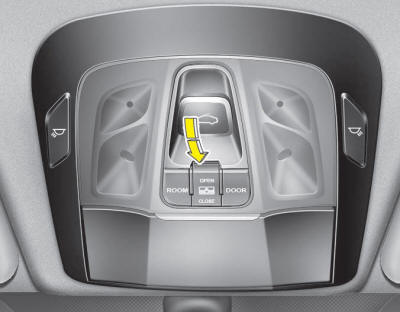
Whenever the vehicle battery is disconnected or discharged, or related fuse is blown, you must reset your sunroof system as follows:
1.Turn the engine on and close the sunroof glass and sunshade completely.
2.Release the control lever.
3.Push the sunroof control lever forward in the direction of close (about 10 seconds)
until the sunroof is moved a little. Then, release the lever.
4.Push the sunroof control lever forward in the direction of close until the sunroof
operates as follows;
SUNSHADE OPEN → TILT OPEN → SLIDE OPEN → SLIDE CLOSE → SUNSHADE CLOSE
Then, release the control lever. When this is complete, the sunroof system is reset.
For more detailed information, contact an authorized HYUNDAI dealer.
✽ NOTICE
If you do not reset the sunroof, it may not work properly.
 Closing the sunroof
Press the sunshade CLOSE button. The sunroof glass will close then the sunshade
will close. To stop the sunroof movement at any point, press the sunshade control
switch momentarily.
If you want ...
 Driver position memory system (If equipped)
A driver position memory system is provided to store and recall the driver’s
seat, outside rearview mirror and steering wheel position or the instrument panel
illumination intensity with a sim ...
See also:
Storing positions into memory using the buttons on the door
Storing driver’s seat positions
1. Shift the shift lever into P (Park) while the ignition switch is ON.
2. Adjust the driver’s seat, outside rearview mirror, steering wheel position and
instrum ...
Using Bluetooth® Wireless Technology Audio Mode
Playing/Pausing Bluetooth® Wireless Technology Audio
Once a Bluetooth® Wireless Technology device is connected, the mode will automatically
start.
While playing, press the key to
pause and pr ...
TPMS Receiver Schematic Diagrams
Circuit Diagram
Connector pin number
Pin NO.DiscriptionRemark1IGN2CAN_Low3-4Battery5CAN_High6Ground
...
Categories
Hyundai Azera Manuals
