
 Hyundai Azera: Smart key receiver Repair procedures
Fifth generation HG (2011–2026) / Hyundai Azera 2011-2026 Service Manual / Body Electrical System / Smart key System / Smart key receiver Repair procedures
Hyundai Azera: Smart key receiver Repair procedures
Fifth generation HG (2011–2026) / Hyundai Azera 2011-2026 Service Manual / Body Electrical System / Smart key System / Smart key receiver Repair procedures
Fifth generation HG (2011–2026) / Hyundai Azera 2011-2026 Service Manual / Body Electrical System / Smart key System / Smart key receiver Repair procedures
| Removal |
RF Receiver
|

| 1. |
Disconnect the negative(-) battery terminal. |
| 2. |
Remove the rear seat.
|
| 3. |
Remove the rear package tray.
|
| 4. |
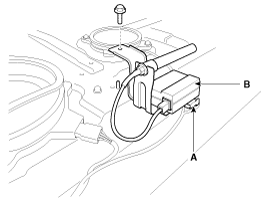
Disconnect the RF receiver connector (A). |
| 5. |
Remove the RF receive (B) after loosening the bolt (1EA).
|
| Installation |
RF Receiver
| 1. |
Install the RF receiver. |
| 2. |
Install the rear package tray. |
| 3. |
Install the rear seat. |
| 4. |
Install the negative (-) battery terminal and check the smart key system. |
 Smart key receiver Specifications
Specification
RF Receiver
ItemsSpecificationFrequency433.92 MHzAntenna typeFSK (Frequency Shift Keying)
...
 Buzzer Repair procedures
Removal
Buzzer
1.
Disconnect the negative(-) battery terminal.
2.
Remove the front left wheel guard.
3.
Remove the external buzzer (A) after disconnecting the connector.
Installation
...
See also:
Bluetooth® Wireless Technology Setting
Pairing a New Device
Press the key
Select [Phone]
Select [Pair Phone]
Bluetooth® Wireless Technology devices can be paired with the audio system.
For more information, refer to the “Pairin ...
Steering Gear box Repair procedures
Replacement
1.
Remove the front wheel & tire (A).
Tightening torque :
88.3 ~ 107.9N.m (9.0 ~ 11.0kgf.m, 65.1 ~ 79.6lb-ft)
•
Be careful not to damage to the h ...
Start/Stop Button Repair procedures
Removal
1.
Disconnect the negative (-) battery terminal.
2.
Remove the AVN head unit.
(Refer to AVN System - "AVN Head Unit")
3.
Disconnect the start/stop button connector. Push the hook ...
Categories
Hyundai Azera Manuals

© 2011-2026 Copyright www.hgmanual.com