
 Hyundai Azera: Start/Stop Button Repair procedures
Fifth generation HG (2011–2026) / Hyundai Azera 2011-2026 Service Manual / Body Electrical System / Button Engine Start System / Start/Stop Button Repair procedures
Hyundai Azera: Start/Stop Button Repair procedures
Fifth generation HG (2011–2026) / Hyundai Azera 2011-2026 Service Manual / Body Electrical System / Button Engine Start System / Start/Stop Button Repair procedures
Fifth generation HG (2011–2026) / Hyundai Azera 2011-2026 Service Manual / Body Electrical System / Button Engine Start System / Start/Stop Button Repair procedures
| Removal |
| 1. |
Disconnect the negative (-) battery terminal. |
| 2. |
Remove the AVN head unit.
(Refer to AVN System - "AVN Head Unit") |
| 3. |
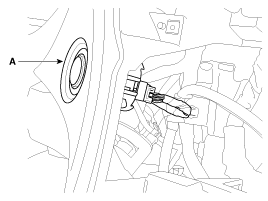
Disconnect the start/stop button connector. Push the hook and remove the start/stop button (A).
|
| Installation |
| 1. |
Install the start/stop button. |
| 2. |
Connect the start/stop button connector. |
| 3. |
Install the audio and heater control unit. |
 Start/Stop Button Components and Components Location
Component
...

See also:
Contacts
Press the key
Select [Contacts]
The list of saved phone book entries is displayed. Select the
button to download the call history.
1) Contacts List :
-Displays downloaded contacts entries
- ...
Special Service Tools
Special Service Tools
Tool (Number and Name)IllustrationUse09546-26000Strut spring compressorCompression of coli spring
...
Operating door locks from inside the vehicle
With the door lock button
To unlock a door, push the door lock button(1) to the “Unlock� position.
The red mark(2) on the door lock button will be visible.
To lock a door, push the doo ...
Categories
Hyundai Azera Manuals

© 2011-2026 Copyright www.hgmanual.com