
 Hyundai Azera: Schematic Diagrams
Fifth generation HG (2011–2026) / Hyundai Azera 2011-2026 Service Manual / Body Electrical System / Button Engine Start System / Schematic Diagrams
Hyundai Azera: Schematic Diagrams
Fifth generation HG (2011–2026) / Hyundai Azera 2011-2026 Service Manual / Body Electrical System / Button Engine Start System / Schematic Diagrams
Fifth generation HG (2011–2026) / Hyundai Azera 2011-2026 Service Manual / Body Electrical System / Button Engine Start System / Schematic Diagrams
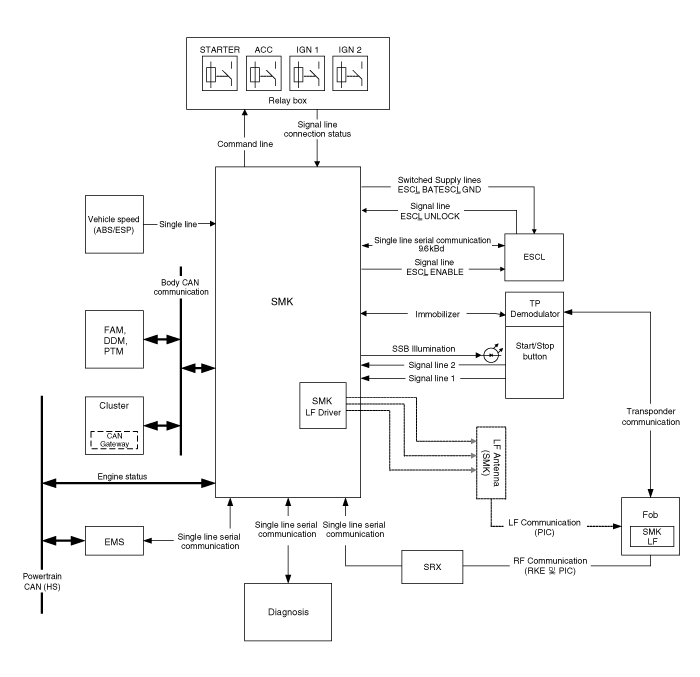
| Circuit Diagram |
 Components and Components Location
Component Location
1. Start Stop Button(SSB)2. FOB key3. Smart key unit4. RF receiver5. Interior antenna 16. Interior antenna 2 7. Trunk antenna8. Door handle & ...
 Description and Operation
Description
System Overview
The System offers the following features:
-
Human machine interface through a 1-stage button, for terminal switching and engine start.
-
Control of external re ...
See also:
Electronic stability control (ESC)
The Electronic Stability Control (ESC) system is designed to stabilize the vehicle
during cornering maneuvers. ESC checks where you are steering and where the vehicle
is actually going.
ESC appli ...
Hood Latch Release Handle Components and Components Location
Component Location
1. Hood latch release handle
...
Timing Chain Components and Components Location
Components
1. Oil pump chain cover2. Oil pump sprocket3. Oil pump chain 4. Oil pump tensioner assembly5. Crankshaft oil pump sprocket6. Crankshaft RH chain sprocket7. RH Timing chain auto tension ...
Categories
Hyundai Azera Manuals

© 2011-2026 Copyright www.hgmanual.com